
WordPress Search Plugins: Introducing Scry Search
I have been working with WordPress for years now. I run a WordPress site for myself, for friends and family, and I run several production WordPress sites for clients. In my time working with WordPress, I have used a host of third-party plugins to build new features on client sites. I have used plugins to build ecommerce stores, to increase file upload sizes, to add ai chatbots to sites, and much more. Throughout the course of my work on websites, one thing that has become increasingly clear is that search matters. A lot. The search bar on your website returning the right results can be the difference between a closing a big sale and missing out. A good search feature can be the difference between keeping a reader browsing and losing them into the ether that is the internet. Search is critically important, and the search feature built into WordPress just doesn’t cut it for clients serious about growth. That is why I built my entry in the WordPress search plugins market: Scry Search, a Meilisearch plugin for WordPress.

The Problems with WordPress Search
WordPress has search built in. So why build a plugin that “reinvents the wheel” so to speak? Well, while it is true that WordPress has search built in, that built in search feature is not particularly advanced or powerful. The built-in WordPress search is essentially a keyword search over three fields of a post: the title, the excerpt, and the post body. It looks for exact matches between the search terms and the text in those three fields. Then, it typically sorts them in reverse publish date order (newest to oldest) and returns results to be displayed to the user.
This system, while serviceable for small websites, leaves much to be desired as a content or product library scales. For one thing, it offers no support for typo tolerance or word stems. That will cause common searches to fail to return relevant results, potentially leading to high bounce rates and low conversion rates. Additionally, in an ideal world, we would like to be able to control the way our search engine sorts results, instead of falling back to the relatively simplistic sorts that are built in.
Another useful feature would be search analytics. This would allow us to know what visitors are looking for, and what results our search engine is returning, which would allow us to optimize our content and products for the things users are looking for, and adjust our rules for generating results to ensure the most common searches yield the results we want to return.
These days, the most modern ecommerce websites have far more than a simple searchbar. Many of them support facetted search, autocomplete in the search bar, and ajax search to improve the user experience. Even more recently, AI has come on the scene, and with it has come semantic search, with a reliance on vectorized text embeddings for capturing similarities in meaning between search terms and content, even when the words have no formal similarity (for example, “king” and “monarch” are semantically similar, even though the sequences of letters that make them up are not very much alike). The simplistic search bar built in to WordPress does not support any of these things by default. So, I decided to build a plugin that does support them.
Meilisearch: An Open-Source Solution
For all the reasons I just specified, it became clear to me that an upgrade to the WordPress search feature was needed. So, I began to research the different methods of implementing those search upgrades, and in the course of this research, I discovered Meilisearch.
Meilisearch is an open-source search engine that anyone can download, set up, and use in any application they want. It provides a thoughtfully-designed REST api that is used for indexing records, configuring settings, and searching libraries of content.
Meilisearch was the answer to all the problems I mentioned above. It is a well-maintained open source search engine that implements all the advanced features that WordPress lacks. By using Meilisearch, I was able to focus purely on the integration from WordPress to Meilisearch, trusting that the implementations of advanced features, like facetted search, indexing, and efficient retrieval were implemented efficiently and reviewed for correct functionality. So, with Meilisearch as the backbone for my new search feature, I began building Scry Search: my entry in the world of WordPress search plugins.
Overview of Scry Search
Scry Search harnesses the power of Meilisearch to vastly upgrade the built-in WordPress search experience. Let’s take a look at some of the features Scry Search gives your WordPress site that it may have been lacking before.
Seamless Integration
This was one non-negotiable for me when building my search plugin for WordPress. It had to provide a upgrade the WordPress search feature without requiring any changes to the frontend templates of the theme. That means no code changes and no specialized blocks. So, that is how I built it. The plugin is 100% compatible both with the built in WordPress search blocks and forms, and with the query loops used to display the results. Therefore, the plugin provides a massive upgrade to WordPress’ search feature, without any frontend changes required, making it easy to get started.
Stemming & Typo Tolerance
This is a staple in search plugins for WordPress. Sometimes, when users search for things on a site, they might accidentally misspell a word. Or, they may not know exactly how to spell the word in the first place. In the case of most misspellings and typos, it is clear enough what they were looking for, so we should still be able to return the correct results to them. But WordPress doesn’t support this by default. Scry Search brings this vital feature to WordPress through the power of Meilisearch.
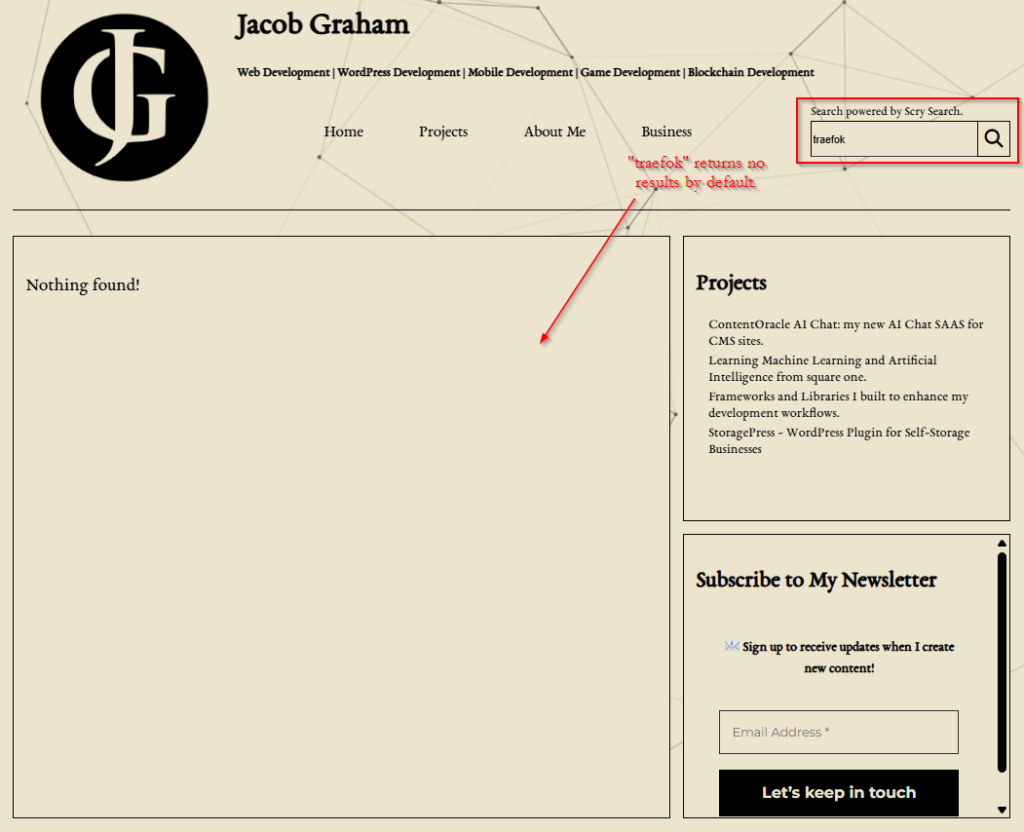
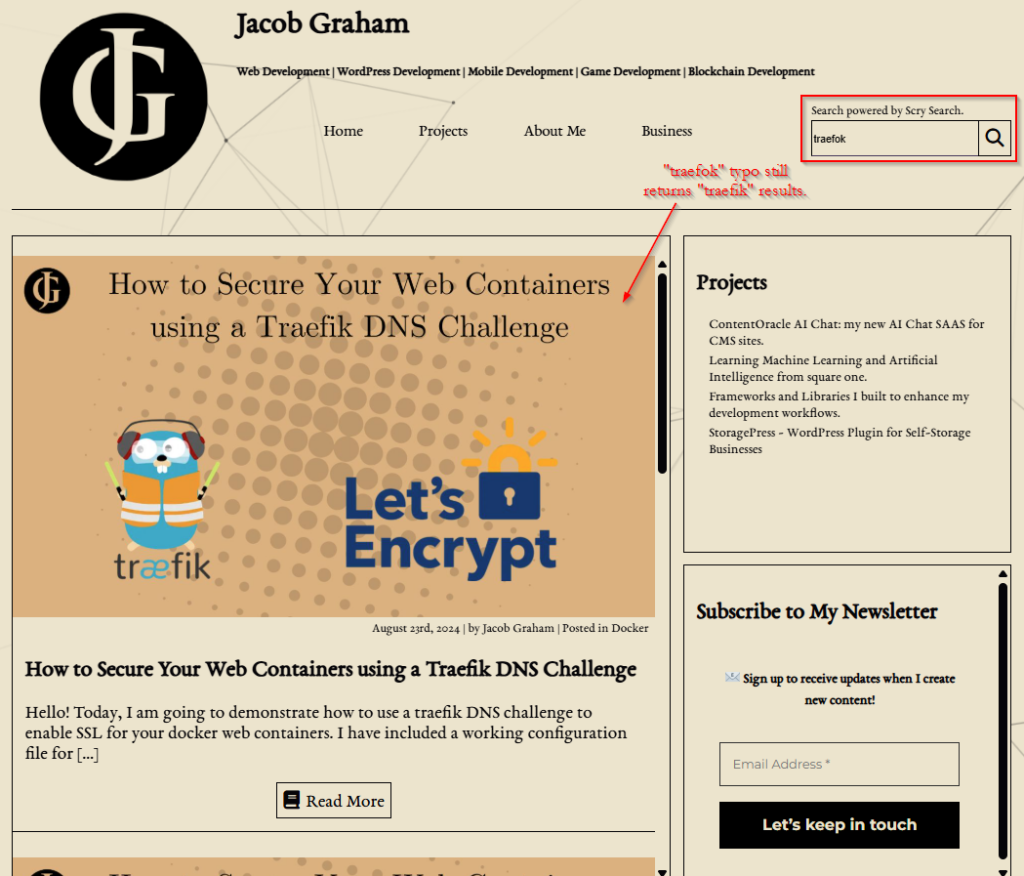
Below, you can see to images. The first shows search results on a WordPress site that relies on the built-in WordPress search feature. You will notice it does not return any results for the term “traefok”, despite that being a clear misspelling of “traefik”, the popular proxy server. The second screenshot shows the site’s upgraded search results after Scry Search is installed. Relevant results are returned in spite of the typo, connecting the searcher to the content they are looking for.
In addition to typo tolerance, this Meilisearch integration provides other important upgrades to WordPress search to ensure relevant results are always returned, such as word stemming, enhanced stopword handling, synonyms, and more.
Typo tolerance and these related features are critically important for ecommerce stores and digital publishers. As content libraries grow, it gets harder for users to find what they are looking for. And if a search fails to return the results the user expects, they may decide to take their business elsewhere. Scry Search delivers these valuable capabilities to WordPress sites like yours.
Customizing Search Rules
Many WordPress search plugins operate using a one-size-fits-all approach. They provide a simple integration with a search engine that leaves little flexibility for you to customize your search experience to best serve your goals. Scry Search grants you unmatched flexibility, allowing you to customize every aspect of your search experience to suit your users’ needs.
Choose Post Types
The first step in customizing your search feature with Scry Search is configuring the types of posts that will be included in your new search. WordPress supports hundreds of custom post types both built in to core, and implemented by plugins. Scry Search is compatible with them all.
You can select the post types that Scry Search searches by visiting the index settings page. There is an input there labelled “Post Types to Index”. Simply select all the post types you want to make searchable in that search bar, and save. This allows you to ensure your search features the types of content you want to promote to visitors, while skipping over custom post types used for more specialized purposes.
Customize Indexes
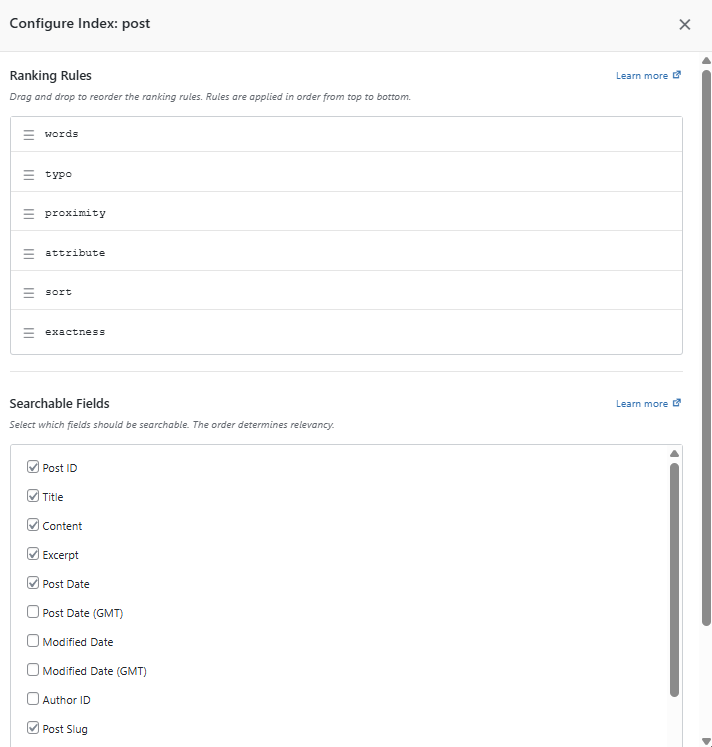
The customization doesn’t end there. For each post type you selected to index, there are a host of rules you can control to make your search experience truly your own. After saving your post types to index, a card for each post type you selected will appear. You can click the “Configure Index” button on that card to get into the weeds of customizing your indexes. There are menus for customizing the Meilisearch ranking rules, searchable fields, synonyms, stopwords, and more.
Weight Results
This WordPress search plugin also lets you apply weights to the different post types that are considered in your search. This means if your search feature indexes results across posts, pages, products, and events, you can push results up or down in the results based on type. For instance, let’s say your website has an ecommerce shop built in, and you want relevant products to appear sooner in the results than blog posts. You can apply a higher weight to the products, which will push them up in the search results than the blog posts. Meanwhile, relevant blog posts will still be returned for searches where there are not relevant products.
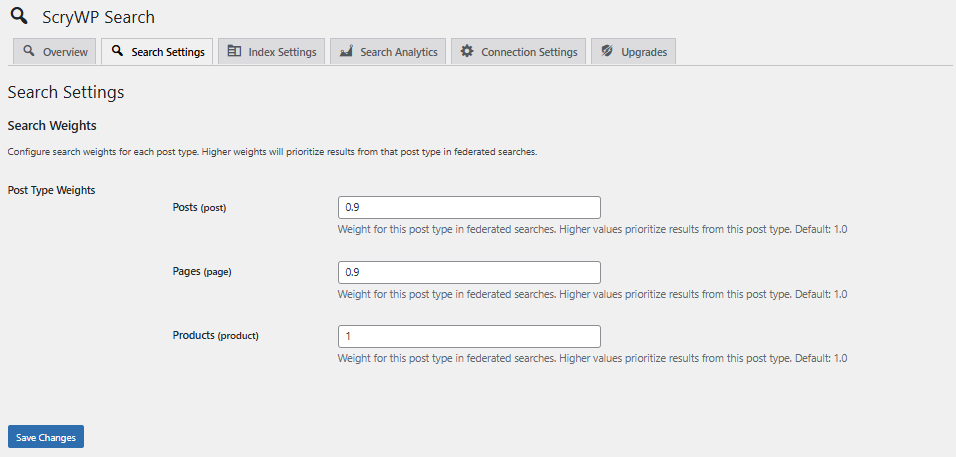
Applying these weights is easy, all you have to do is enter a higher number in the box next to the post type you want to appear higher in the results.
Analytics
Search analytics are critical for finding gaps in your site’s content, for finding where customers might be getting lost, and for finding insights on where future efforts should be focused. WordPress has absolutely no analytics built into its search feature. That means all that information is lost to the ether.
Scry Search fixes this issue. Featuring an intuitive analytics dashboard built directly into the WordPress admin dashboard, this plugin can tell you what your visitors are searching for, what results your site is returning, and even show you trends via dynamic graphs and charts.
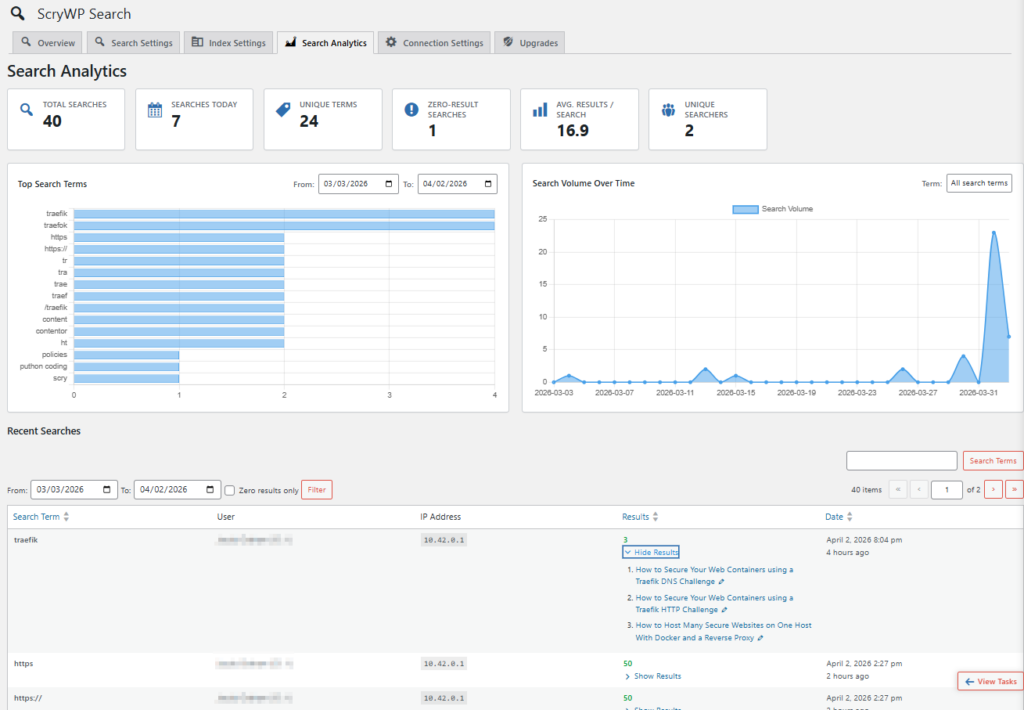
The analytics feature also has an anonymization feature built in, which allows you to stay compliant with privacy regulations if those apply to you.
Meilisearch Tasks Log
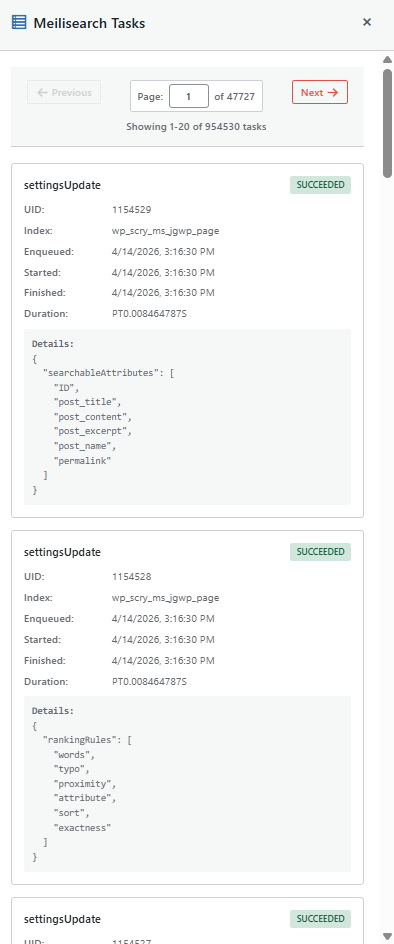
This is one of the features I am most excited about as a developer. This plugin features a unique integration with the Meilisearch Tasks api that allows the plugin to show the payloads, status, and responses of all requests sent to the Meilisearch instance. This is super useful for setting the plugin up for clients, debugging, and for tracking a history of changes made in the system. To open it, all you have to do is click the little floating button in the bottom right corner of your screen that says “View Tasks” while on a Scry Search admin page, and a paginated drawer will open with all the task information on it
Premium Search Features
Scry Search is not going to be where the train stops! It is designed to be upgradeable, and I will be producing a series of upgrades for it over the coming year. These premium plugins will be licensed at a yearly rate, you pay for one year of access to the latest versions, support, and upgrades.
A facetted search plugin is already underway and nearing completion. Plugins that implement autocomplete in the searchbar, ajax search, upgraded analytics, and semantic search are all on the books right now. With Scry Search premium plugins, the sky is the limit for your website’s search feature!
Managed Cloud Meilisearch Hosting
This is our crown jewel at Scry Search! There are many out there who want to upgrade their search feature with a search engine like Meilisearch, but just don’t have the technical knowledge to set it up. That problem is eliminated with Scry Search’s premium cloud hosting. With just a sign up and a few clicks, you can have your very own secure, highly available Meilisearch instance set up in the cloud on dedicated hardware. All the complex server management and provisioning is handled by us at Scry Search! All you have to do is register for an account at scrywp.com, choose your server tier, and copy/paste your api keys into your WordPress site, and you are ready to start indexing and searching posts! Scry Search provides you with useful performance metrics like CPU/RAM/Disk usage, deployment information, and even a handy repair button to help when things go wrong!

Scry Search: Standard Among WordPress Search Plugins
Scry Search has been my main ongoing project stretching back into 2025. It was thoughtfully designed to take advantage of all the most powerful features of Meilisearch in an easy-to-manage way for nontechnical WordPress users. Scry Search offers everything you need to take your WordPress site to the next level. By decreasing bounce rates and increasing conversions, it is a valuable tool in turning your website into a vector for business growth. Head on over to scrywp.com today and give it a try! If it helps you out, don’t forget to leave a 5-star review on the plugin directory! Thank you!
Leave a Reply