
Building the Best Car Detailing Software for Xelerate Detailing
My business is building awesome new car detailing software to help car detailers run their businesses more efficiently. Read about how it is going!
The Vision

In May of 2025, JG Web Development was approached by the owner of a car detailing business. He had a vision in mind for an all-in-one platform specifically devoted to helping owners of car detailing businesses to run their operations more efficiently. He wanted an intelligent system for managing and booking appointments, records of business data and services offered, online payment processing, marketing integrations, mobile compatibility, and much more.
The development process began with organizing all the many ideas our client had in his head into manageable software features. cont
The Tech Stack
In choosing the tech stack for this application, there were a number of factors that influenced our decision. Firstly, the client indicated that while he was primarily looking for a web app right now, in the future he indicated that he wanted the option to bundle the software into a mobile application. That information drove our decision to build this software as a decoupled frontend and backend: a JavaScript-based web app and a REST api on the backend. This allowed us to build a user client that could run equally well in a browser or as a native application, and a backend that could focus solely on validating and managing the app’s data, regardless of what type of client the data was coming from.
Backend
The backend API framework choice was an easy one for me: I love building apps in Laravel. Whether you are building a REST api or a monolithic server-rendered web application, Laravel is full of fabulous tooling and thoughtful design choices that help get the job done quickly, easily, and in a way that scales well. Laravel’s database management utilities, MVC architecture, and middleware and policies for access control made it a hands-down choice for our team.
To get us off the ground quickly, we used Laravel Breeze to bootstrap our user registration, authentication, and verification processes. This allowed us to get straight into building the mission-critical features of the app, without wasting time on boilerplate.
One particularly important aspect of Laravel that helped us get off the ground quickly was Laravel Sanctum, an add-on that implements both cookie-based and token based authentication for apis. Because our backend is an api that is only meant to be read by the frontend app we built, we opted to stick with cookie-based authentication, which required almost no configuration on our end.
Frontend
For the frontend, we chose to implement a comprehensive Vue Application via the Nuxtjs framework, using Ionic Framework as our UI library. We chose this choice because the Nuxt is ideal for building scalable Vue applications (and Vue is much easier to user than React), and comes with a lot of built-in conveniences such as file-based routing, auto-importing components, and easier SSR.
Ionic Framework was our UI library of choice for one simple reason: it offers IOS and MD ui components out of the box, which will make bundling as a mobile app easy as pie down the road when we decide to do that. And, it will give our applications a native feel, whether they run on an IOS or an Android device.
Finally, we decided to use an awesome open-source package to handle user authentication with our Laravel API. nuxt-auth-sanctum fully handles uses Laravel Sanctum’s cookie-based authentication and CSRF protection to protect application resources against unauthorized access, and to ensure that requests are coming from a the frontend application.
For the frontend, the tech stack choices were really more about what not to use, due to the building for mobile constraint. We intentionally avoided any packages that would be unlikely to be compatible with a mobile build, and in general tried to keep our external dependencies to a minimum.
Features
This app is every changing and growing in scope. Our client has big dreams for it, and wants to turn it into the place to go for all your auto detailing needs. Because of that, the major features of the app will be constantly changing as this project grows and adapts. But for now, let’s take a look at some of the major features:
Easy Booking Form
The booking form is the singular feature we spent the most time agonizing over. This form is where conversions are made for businesses… so it had to be easy, intuitive, and enjoyable to use. We began our work by distilling down the booking process to decide what the important info we needed to collect was for an appointment booking. The vital data was:
- Customer contact info.
- Services requested.
- Date/time.
- Service location.
We decided to collect customer contact information when users sign up for an account. Therefore, in order to book an appointment, all users are required to sign up for an account. This allows us to filter spam via email verification, and remove an entire set of inputs about the customer from the booking form.
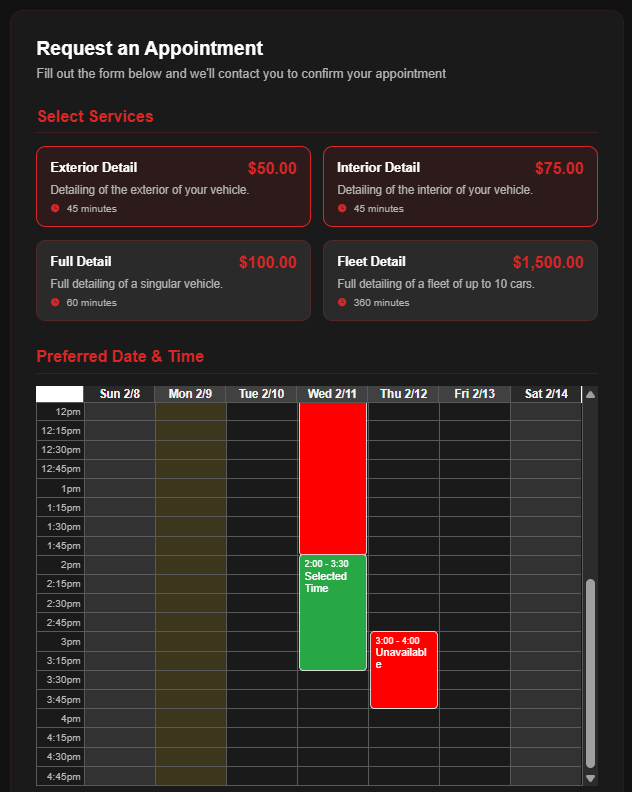
That left three major sections on the booking form: services, date/time, and location. For services, we made simple cards that the user can click to toggle which services they would like to book. Then, based on the services they have selected, the date and time input will change. It shows a weekly calendar, with times available during the business’ operating hours. Prospective customers can click a day and time on that calendar, and a preview of the service will be shown. Times that are already booked are shown as blocked out on the calendar, ensuring that customers cannot book an appointment when the business already has another appointment scheduled.
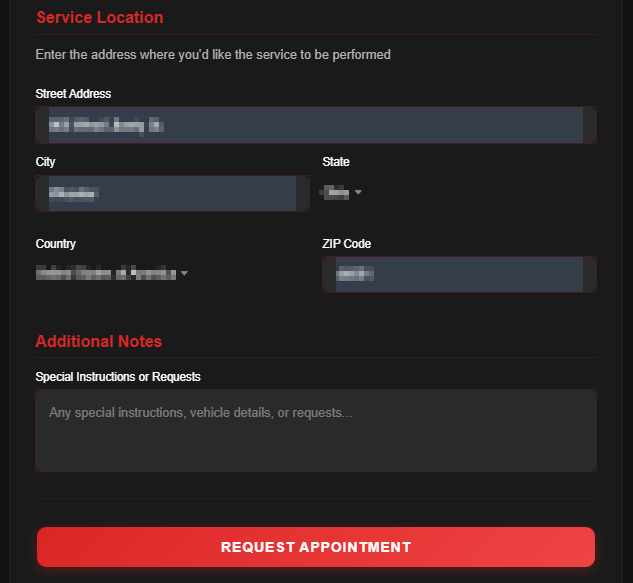
Finally, for the location, we went with a simple set of address inputs, and added an additional notes box at the bottom for good measure. Add in some form validation and wire everything up to our api, and we had a really nice booking experience.
Business Management Suite
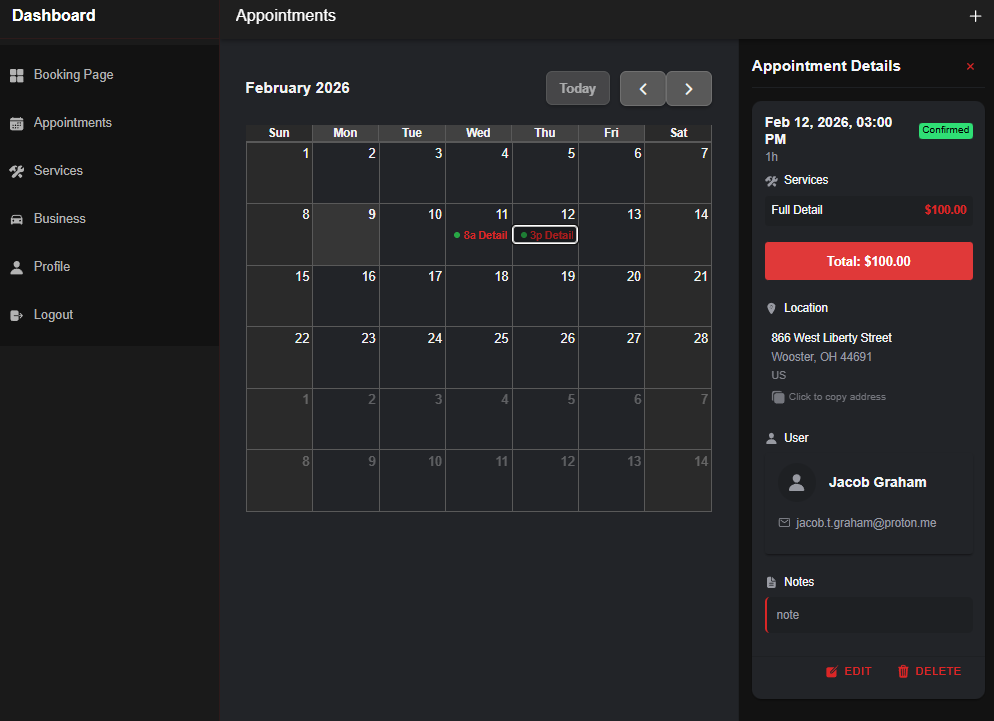
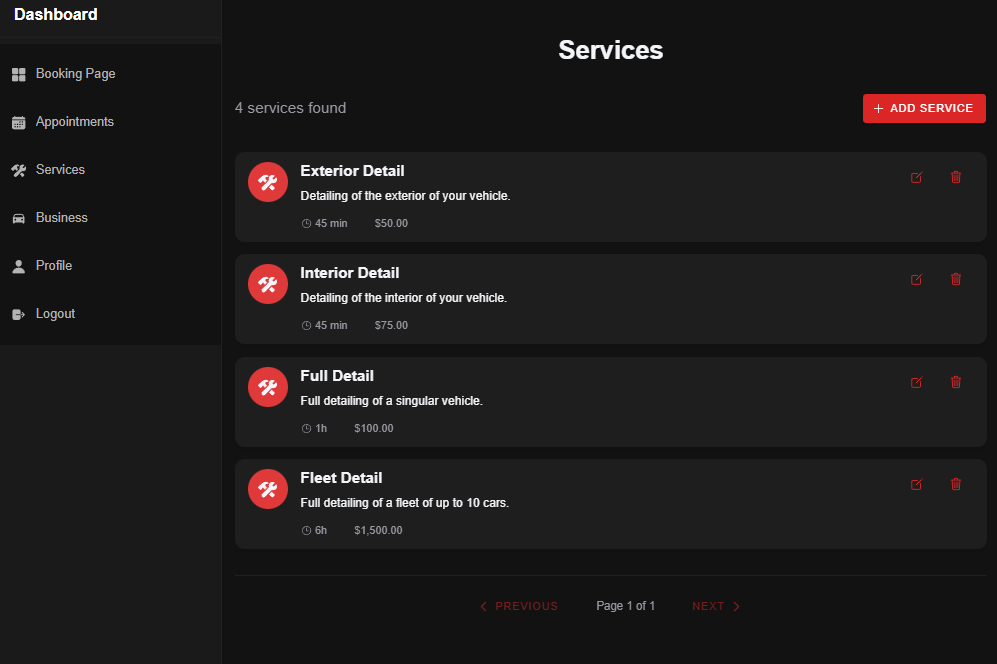
The main feature Xelerate Detailing offers to businesses at the moment is a comprehensive business management suite where they can manage all aspects of their business. When a user signs up for an account, they have the option to create a business. Upon doing so, they are given a business appointment calendar (to track bookings with their business), a service management interface (for managing the services they offer), a business profile management page (for displaying info about their business), and an appointment booking page (so customers can book appointments directly to their calendar. These features are custom-designed for auto detailers to help them get their businesses up and running fast.
Customer Profile
Midway through our second round of development, we realized that we wanted to require all customers to register for accounts. One thing this allowed us to do was to create a customer dashboard for all users who use the app to book appointments, rather than to run their businesses. So, we added a Fiverr-like option to switch from “Business Mode” into “Customer Mode” and gave them their own unique set of dashboard pages. Now, they can log in to view all their upcoming appointments from all detailing businesses. This system also gives us a strong platform to launch new features from, like business reviews and recurring appointments.
Coming Soon: Payment Processing
The main feature on deck right now is payment processing. We want to make it easy for detailing businesses to accept payment for their services online. So, we are planning a Stripe Connect integration that will allow Xelerate Detailing to handle payments from customers to businesses. Payment processing will be the first of the premium features that will require businesses to have a paid subscription with Xelerate Detailing. This feature will be a major value-added proposition for anyone looking to use Xelerate Detailing to run their auto detailing business.
Challenges
In any custom application, there are going to be challenges and difficulties that come up in the development process. Most of these were relatively simple to solve, but one was particularly nasty, and took a lot more time than I care to admit to get right, and that problem was handling the dates and times of appointments on devices with different timezone settings.
Timezone Issues
Without a doubt, the biggest problem we have faced so far with this application revolved around inconsistencies in the input dates and times of appointments, and the way they were stored and returned to the browser on later pages.
What would often happen was this: I would test booking an appointment with a business. I would choose a date and time for the appointment, and submit the booking form to create an appointment request. Then, I would log in to the business account, and go look at the appointment calendar, and… the time of the request would be different! To be precise, it would be offset by several hours.
I zeroed in on the issue over several sessions of debugging. It turned out that the Xelerate Detailing api was interpreting all provided datetime records as UTC+0:00. But, the time zone set in my browser I was testing on was in a different UTC time zone, and it was sending datetimes with UTC offsets greater than 0 to the api, which was interpreting them as UTC+0:00, and returning them to the frontend as UTC+0:00, which was then outputting them as UTC+0:00, which led to the discrepancies. To fix this, we simply convert all datetime and time records to UTC+0:00 before processing them on the api. Then, the api could safely process all datetimes as UTC+0:00, and return them that way, and all data outputted from the api on the frontend would likewise be accurate.
Next Steps
xeleratedetailing.com has all the pieces needed to become the premium car detailing software for auto detailing businesses and customers to choose. The business management features, booking interface, and customer profile dashboard offer a strong set of baseline features for any business. Going forward, we have a ton of ideas for new features to really build Xelerate Detailing into somethings special. Online payment processing, built-in reviews, a filterable, location-based business geo-search feature, and much more are on horizon.
In the meantime, the software is fully ready to use, meaning you can start using it to run your business today. Give it a try today, and let us know what kind of features you would like to see in your auto detailing business management software!
Leave a Reply